
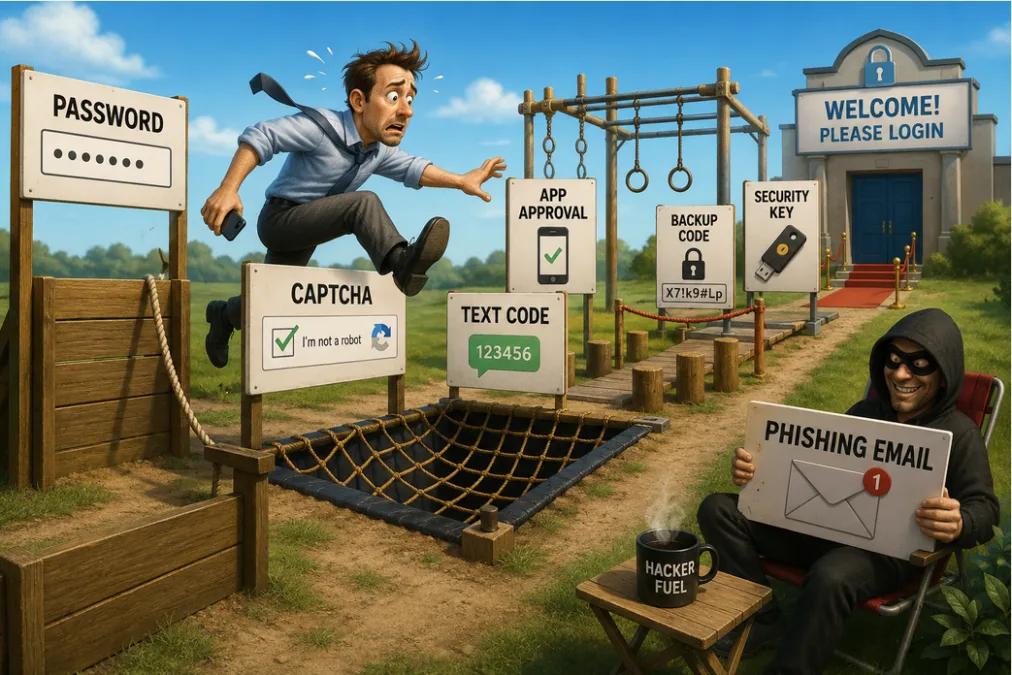
The Death of Sanity: Why a Solid Password Beats 2FA (and Who We Have to Thank for This Mess)
Picture this: You’re sitting on your couch at 11:30 PM, trying to log into your bank account to see if that $14 charge for gourmet artisanal cheese cleared. You enter your username. You enter your perfectly crafted, 14-character password.
But wait! The screen freezes. “We’ve sent a 6-digit code to your mobile device.”
Now you have to find your phone, which is currently wedged between the couch cushions. You dig it out, wake up the screen, open the messaging app, memorize 482 917, and type it back into your laptop before the 30-second timer expires.
Congratulations. Some IT dork at a corporate bank just got a promotion for turning your life into an ongoing, high-stakes memory game.
Let’s be honest: Two-Factor Authentication (2FA) is a scam disguised as security. We’ve traded basic digital literacy for a clunky, multi-device nightmare. If users just stopped being aggressively lazy and followed the most basic rules of a decent password, we wouldn’t need this digital babysitter.
The 2FA Con: You’re Just Doing Extra Homework
The tech industry treats 2FA like it’s the holy grail of cybersecurity. But let’s look at the math. If you have to enter a six-digit verification code every time you log in, you are literally being forced to memorize and enter a brand-new password every single time.
Worse yet, 2FA completely abdicates your security to whoever controls the hardware.
- Did your phone battery die? You’re locked out of your life.
- Did you get hit by a SIM-swapping scam? A hacker just intercepted your code.
- Left your phone in an Uber? Hope you didn’t need to access your email today.
If you know how to follow the most basic rules of a decent password—minimum 8 characters, one uppercase letter, one number, and one special character—and you actually keep track of it, a strong password and basic digital hygiene are all you really need. But because people insist on using sunshine, hello, or password123, the rest of us are punished with endless text message alerts.
Breaking Down the Login Security Matrix
To prove that we are living in a over-engineered dystopia, let’s objectively look at the pros and cons of the ways we secure our digital lives.
| Security Method | The Good | The Bad | The Verdict |
| The Classic Strong Password (8+ Chars, Mix of Types) | Fast, requires zero external hardware, entirely under your control. | Requires you to actually use your brain (or a password manager) instead of being lazy. | The Undisputed King. If you aren’t using password123, this is a fortress. |
| Magic Links (Sent via Email) | No password to remember. Click a link in your inbox and you’re in. | If a hacker gets into your email, they now own every single account you possess. | Better than 2FA. At least it keeps the interaction on the same screen/device. |
| SMS/App Verification Codes (2FA) | Makes it harder for a hacker in Belarus to guess your account. | Total reliance on cellular networks, battery life, and SIM-card security. | A glorified chore. Making us type temporary passwords because we can’t remember permanent ones. |
| Hardware Keys (YubiKeys, etc.) | Extremely difficult to hack remotely. | If you lose that tiny USB stick, you are legally dead to the internet. | Paranoid Android. Great for CIA operatives; highly impractical for ordering pizza. |
| Biometrics (FaceID/Fingerprint) | Incredibly fast and convenient. | You can’t change your face if a database gets leaked. Also, cops can legally force your thumb onto a scanner. | The Lazy Compromise. Great until someone clones your thumbprint with a 3D printer. |
Bring Back Personal Responsibility
We don’t need more authenticators, dongles, or expiring tokens. We need people to stop treating password creation like an annoying hurdle and start treating it like the digital lock to their front door.
Invest five minutes into a password manager, or write your complex phrases down in a physical notebook locked in a drawer. Stop using your pet’s name followed by the year you graduated high school.
To the IT genius who invented the six-digit verification loop: I hope both sides of your pillow are warm tonight. For the rest of us, let’s bring back the glorious efficiency of a strong, un-guessable password and tell 2FA to take a hike.
The Great 2FA Circus: How Logging In Became a Part-Time Job
Remember when logging into a website involved entering a username and password?
Apparently that was too easy.
Somewhere deep inside a corporate office park, an IT manager desperately chasing a promotion stood up in a meeting and said:
“What if users had to prove they were themselves… twice?”
The room erupted in applause.
A PowerPoint was approved.
A budget was allocated.
And thus began humanity’s descent into the modern login experience.
Today, signing into a website often feels less like accessing your account and more like attempting to launch a nuclear missile.
The Good Old Days
Back in the ancient era known as “2010,” security was simple.
You had:
- A username
- A password
- Basic common sense
The system worked surprisingly well.
Sure, some people used passwords like:
- password
- sunshine
- hello
- qwerty
- ilovemydog
But that’s not a password problem.
That’s a user problem.
If someone writes their ATM PIN on the back of their debit card, we don’t conclude that PIN numbers are a failed technology.
Yet somehow every time someone uses “password123” and gets hacked, the entire internet decides passwords themselves are broken.
The Modern Login Experience
Today, the average login process looks something like this:
- Enter username.
- Enter password.
- Confirm you’re not a robot.
- Select all pictures containing bicycles.
- Select all pictures containing traffic lights.
- Select all pictures containing emotional support squirrels.
- Receive six-digit code.
- Enter six-digit code.
- Receive second six-digit code.
- Approve login from phone.
- Confirm approval of phone approval.
- Sacrifice goat.
At this point you’ve spent more time logging into your bank than actually checking your balance.
The Six-Digit Password Nobody Wants To Admit Is A Password
Here’s the part nobody wants to discuss.
A verification code is basically just another password.
Except unlike your regular password:
- You can’t choose it.
- You can’t remember it.
- You can’t use it twice.
- You have to go find it every single time.
Congratulations.
We reinvented passwords and somehow made them worse.
It’s like replacing your house key with a locksmith who follows you everywhere and makes a brand-new key every time you want to enter your own front door.
The Hardware Device Problem
2FA enthusiasts love saying:
“Even if somebody steals your password, they still need your phone.”
Fair point.
But now we’ve simply moved trust from one thing to another thing.
Who controls the phone?
The user.
The same user who:
- Clicks suspicious links.
- Installs random apps.
- Falls for fake package-delivery texts.
- Uses public Wi-Fi in airports.
- Hasn’t updated their phone since the Obama administration.
We didn’t eliminate human stupidity.
We attached it to a battery.
Security Methods Ranked By Human Sanity
Passwords
Pros
- Fast
- Simple
- Familiar
- Works everywhere
Cons
- People choose terrible ones
- People reuse them
- People forget them
Verdict
Still criminally underrated.
Email Verification Codes
Pros
- No app required
- Most people already understand email
- Easy recovery
Cons
- Email becomes a single point of failure
- Can be annoying
Verdict
Not perfect, but surprisingly practical.
Magic Login Links
Pros
- No password to remember
- User clicks one link
- Extremely simple
Cons
- Depends entirely on email security
Verdict
Possibly the most user-friendly system ever invented.
Text Message Codes
Pros
- Easy to understand
- Widely supported
Cons
- SIM-swapping attacks
- Delays
- Spotty delivery
- Makes you stare at two devices
Verdict
Better than nothing.
Not nearly as magical as security consultants pretend.
App-Based 2FA
Pros
- Strong security
- Difficult to intercept
Cons
- Extra steps
- New device headaches
- Backup code chaos
Verdict
Excellent security.
Mediocre user experience.
Hardware Security Keys
Pros
- Extremely secure
- Resistant to phishing
- Security nerds love them
Cons
- Costs money
- Easy to lose
- Causes panic when misplaced
Verdict
Fantastic if you’re protecting millions of dollars or state secrets.
Slight overkill for your fantasy football league.
The Password Nobody Wants To Hear
The uncomfortable truth is that most account compromises don’t happen because a password had nine characters instead of twelve.
They happen because:
- People reuse passwords.
- People fall for scams.
- People click bad links.
- People hand credentials directly to attackers.
- People store passwords in ridiculous places.
Security experts sometimes act like users are cryptographic supercomputers.
They’re not.
They’re Dave.
Dave clicks things.
The WTFYI Conclusion
For the average person, a strong unique password and basic common sense already eliminate most of the danger.
For sensitive accounts like banking, investments, business systems, and email accounts, adding a second factor is usually worth the inconvenience.
The problem isn’t that 2FA exists.
The problem is that half the internet has transformed logging in into an escape room.
The ideal security system isn’t the one with the most steps.
It’s the one that provides strong protection while requiring the fewest opportunities for Dave to screw something up.
And if your login process requires three devices, four verification screens, six codes, a backup code, a recovery code, an authenticator app, a hardware key, and a blood sample…
Maybe the hackers aren’t the biggest threat anymore.
SEARCH FOR ANY ARTICLE BY KEYWORD
More results...